

Updated: 13 Aug 2026
Originally Published: 11 Jun 2024
Certificate of Destruction Hard Drive is documentation that’s likely required by your company for compliance and auditing reasons when securely erasing data. But what is a Certificate of Destruction for hard drives, when is it needed and how can you get your hands on one?
In this blog, you can find answers to the above questions and instructions on how to produce certificates with BCWipe Total WipeOut.
Skip to step-by-step instructions on how to obtain a Certificate of Destruction.

What Is a Certificate of Destruction?
A Certificate of Destruction (CoD) or Certificate of Erasure (CoE) is an audit document providing confirmation that all information stored on hard drives, SSDs or other types of storage media has been erased with due diligence and is unrecoverable even with the use of advanced forensic tools. Certificates also prove that organizations or individuals have erased information in a way that complies with established data protection regulations, such as GDPR.
What Is Included in a Certificate of Destruction?
The following components must be included in a valid Certificate of Destruction or Certificate of Erasure:
- A unique report number, certificate number or digital identifier
- Serial and model numbers of the disposed device
- Method of data sanitization used
- Method of verification used
- Name of the software used for media sanitization
- Name of the individual that performed sanitization or data destruction
- Signature of the official that verified the disposal process
- Date and time the data sanitization process was carried out
When Is a Certificate of Destruction Needed?
As mentioned above, a Certificate of Destruction is required for matters of legal compliance and auditing data destruction processes. Along with expanding on these 2 points, let’s take a look at the other reasons why a CoD for hard drives or CoE may be needed.
Regulatory & Legal Compliance
Effectively sanitizing or destroying data is necessary for you or your organization to comply with data protection regulations like GDPR, CCPA or industry-specific standards.
Here is a list of industry-specific statutes that require organizations to maintain a Certificate of Destruction or Certificate of Erasure:
– Banking & Financial: DORA, GLBA and FTC Safeguards Rule
– Healthcare: HIPAA HITECH Security Rule
– Consumer Credit: GLBA and FTC Privacy Rule
– For all other private organizations, the NIST 800-88 Guidelines for Media Sanitization are the de facto guidelines for privacy legislation
No matter how you choose to remove data, possessing a valid Certificate of Destruction is needed to remain compliant.
Auditing & Accountability
For internal and external auditing of data disposal processes, possession of relevant certificates will be needed to prove that data has been effectively removed using appropriate sanitization or destruction techniques.
Organizational Risk Management
Certificates of Destruction and Certificates of Erasure prove that data stored on a particular device has been securely and effectively removed. In turn, this should provide organizations with confidence that sanitized or destroyed data cannot be breached in any way.
Trust in Third-Party ITAD & Donation Scenarios
Companies that are outsourcing their media sanitization to ITAD (IT Asset Disposition) partners should be provided with a Certificate of Destruction or Certificate of Erasure to be sure their information has been disposed of safely and securely. If you are planning on donating computers to NPOs, it’s also necessary to provide them with a Certificate of Erasure to prove that systems have been completely wiped of information.
How to Obtain a Certificate of Destruction
A Certificate of Destruction can be generated by most trusted data wiping software. For example, BCWipe Total WipeOut provides tamper-proof certificates that come with digital signatures to prove that erasure reports have not been illegitimately edited or falsified. Here are instructions on how to retrieve a tamper-proof wiping report with BCWipe Total WipeOut in just a few clicks:
- After the wiping process has finished, check the ‘Device page’ and click on ‘GET REPORT’.
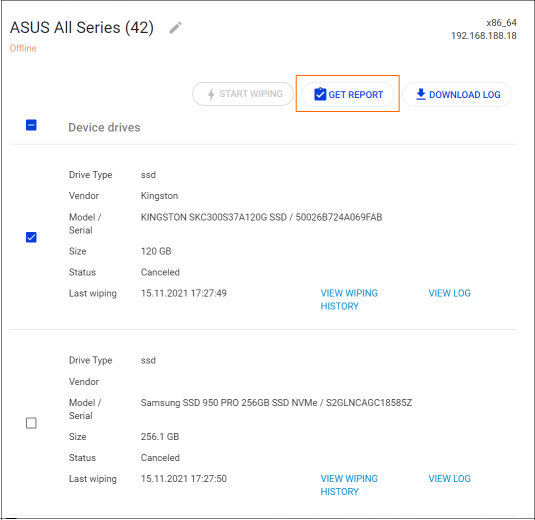
- Your tamper-proof wiping report will now be downloaded with the default settings.
Users can customize reports with BCWipe Total WipeOut in order to adjust tamper-proof certificates to meet specific requirements. Here’s how to do so:
- Switch to the administration tab and select ‘Reports’.
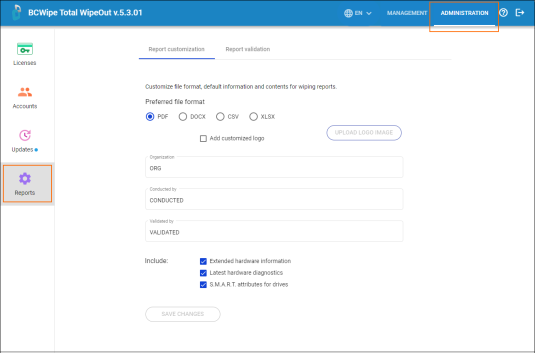
- The ‘Reports’ section allows you to customize file format, default information and wiping report content. You can also validate previously generated reports.
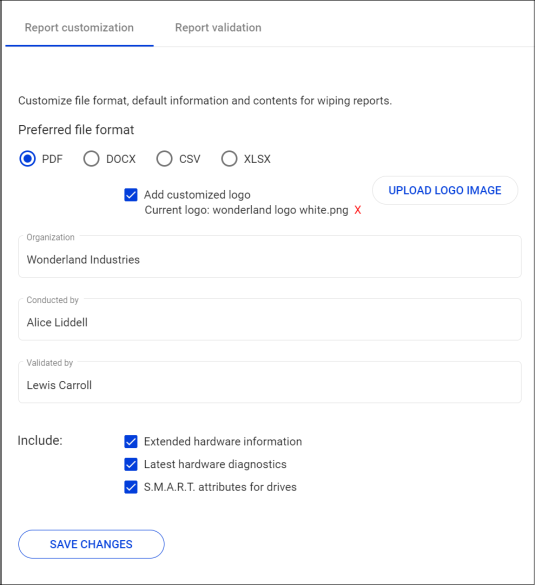
- By customizing tamper-proof certificates, you can choose to include the latest hardware diagnostics, extended hardware information and health statistics reports from built-in S.M.A.R.T (Self-Monitoring Analysis and Reporting Technology).
- The option to upload your company logo is also available.
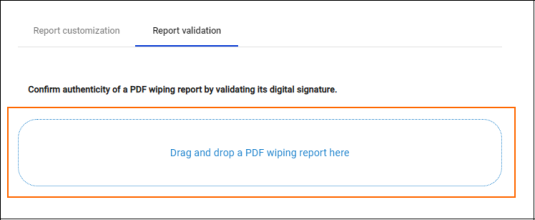
Each tamper-proof wiping report is automatically generated with a digital signature that can be checked by accessing the ‘Report validation’ tab. The engine will examine the digital signature and report whether the document is authentic or not. To ensure that your certificates are tamper-proof, just make sure that erasure reports are generated as PDF files.
Certificate of Erasure by BCWipe
Trusted by the U.S. Department of Defense for over 15 years, BCWipe Total WipeOut is Jetico’s software for wiping hard drives beyond forensic recovery. Owners of hard disk drives (HDDs), solid-state drives (SSDs), Macs and NVMe devices can use BCWipe Total WipeOut to securely erase entire drives. After wiping your device with BCWipe Total WipeOut, you can use the software to generate tamper-proof certificates of erasure that include all the components listed above.
To get started with BCWipe Total WipeOut, contact our Data Protection Specialists and request a free trial. To learn more about how to wipe hard drives clean, read our ultimate guide.
Frequently Asked Questions (FAQs)
A Certificate of Destruction, sometimes called a Certificate of Erasure, is official documentation proving that data stored on a device has been securely erased and can’t be recovered. It confirms that approved sanitization methods were used and that the data removal process was completed successfully. Organizations rely on this certificate as evidence of proper data disposal.
A certificate is typically required when devices are decommissioned, repurposed, donated or disposed of after storing sensitive data. Many regulations and standards, including GDPR, HIPAA and NIST SP 800-88, expect organizations to prove that data was securely erased. Auditors or regulators may request this documentation during compliance reviews.
A valid certificate should clearly identify the device and the erasure process. This usually includes serial or asset numbers, the wiping method used, verification details, the date and time of erasure. It should also record the software used and who performed or approved the process to ensure traceability and accountability.
Certificates are typically generated automatically by trusted data wiping software once the erasure process completes successfully. The certificate should be tamper-resistant and protected against modification so it can be safely used for audits. Automated reporting reduces human error and ensures consistent documentation across devices.
Without a certificate, an organization may struggle to prove that sensitive data was properly erased. This can lead to failed audits, regulatory penalties or increased liability if a retired device later exposes data. Certificates provide documented proof of due diligence and help protect organizations from legal and compliance risks.
Related Articles
CMMC 2.0 Levels, Controls & Framework for Media Sanitization Requirements
NIST SP 800-88 Guidelines for Media Sanitization Explained
IEEE 2883-2022 Standard for Sanitizing Storage
IRS Publication 4812 & How to Comply with Wiping Standards
How to Securely Wipe Your Windows 11 Computer Clean
How to Wipe a Hard Drive on a Dead Computer
How to Wipe an NVMe Drive
How to Delete Files on SSD