

Updated: 14 Aug 2026
Originally Published: 15 Feb 2023
Organizations that have access to or manage Internal Revenue Service (IRS) data are required to comply with the wiping standards outlined in Publication 4812: Contractor Security & Privacy Controls.
In this blog, we summarize what the IRS says about full disk and selective wiping. Finally, we will share 3 tips on how to implement a successful IRS compliance strategy.

Publication 4812 in a Nutshell
- When?
Publication 4812: Contractor Security & Privacy Controls came into effect in 2013. The latest edition of the publication, Revision 13, came out in December 2022. - What?
Publication 4812 was released to identify security requirements for contractors and subcontractors who handle or manage IRS information. Chapter 21: Media Protection is the section of the publication that deals with the IRS wiping standards. - Who?
Publication 4812 is mandatory to follow for IRS contractors and contractor personnel who…
– Have access to Federal Information or information systems
– Are responsible for handling or processing Federal Information or information systems pursuant to or in the course of performance of a contract, order, or agreement with the IRS
What Does Publication 4812 Say about Full Disk Wiping?
Page 82 of the publication explains that the most common way to clear data is to “perform a disk wipe using a software tool that overwrites all sectors of the disk with positive and negative (0 and 1) values.” The publication goes on to state: “IRS standards require 7 overwrites when the data contains FTI [Federal Tax Information], otherwise 3 passes are acceptable.”
According to Publication 4812, full-disk wipes must be applied to workstations and laptops. The following 3 software tools are the only solutions that the publication lists as being validated by the International Standards Organization (ISO):
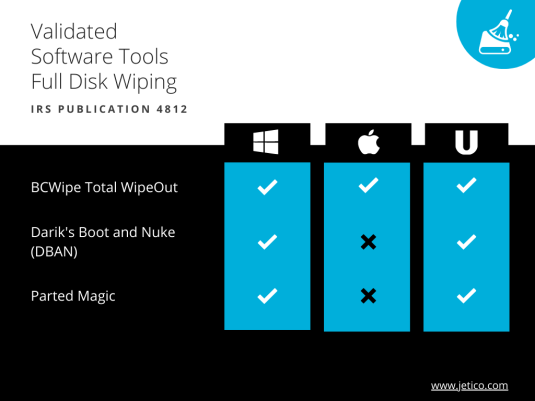
- Windows: BCWipe Total WipeOut, Darik’s Boot and Nuke (DBAN), and Parted Magic
- MAC: BCWipe Total WipeOut
- UNIX/Linux: BCWipe Total WipeOut, Darik’s Boot and Nuke (DBAN), and Parted Magic
What Does Publication 4812 Say about Selective Wiping?
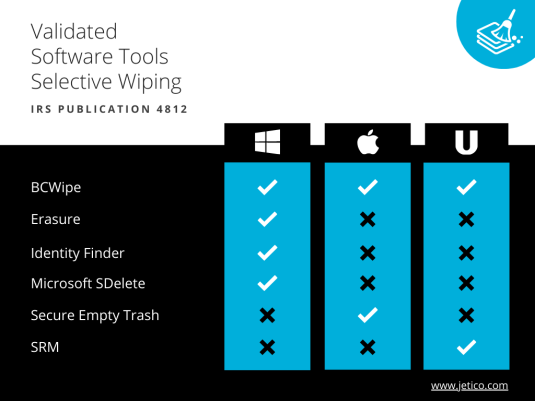
Page 82 of the publication says that “partial data clearing can be appropriate for IRS data stored on file servers that also contain other customer information.” Organizations can use software tools to overwrite selected files and folders, therefore retaining the data of other customers. Like with full disk wiping, there are only a few solutions that Publication 4812 lists as being validated by the ISO:
Prepare to Comply with IRS Publication 4812
By following these 3 steps, you can ensure that your organization is able to comply with IRS wiping standards:
#1 Identifying & Mapping IRS Data Locations
It’s your responsibility to know where your data is, even if you outsource data storage to a cloud provider. Map your data flows and build a clear picture of where your information is located, as well as how it’s being accessed and shared. When the time comes, finding the information to erase will be much faster and easier.
#2 Data Classification & Accountability
The next step is to get (and stay) organized. Start by creating an inventory – classify data by importance and level of risk. It’s also a good idea to put someone formally in charge of data protection. This sends a message to your customers (and compliance officers) that you take the protection of their data seriously.
#3 Selecting the Appropriate Wiping Tools
What kind of data do you need to erase? Answering this question will help you understand what type of software to use.
- If you have sensitive data on a computer that’s no longer needed, then you should use software that’s able to wipe your entire hard drive: BCWipe Total WipeOut for Windows, MAC and UNIX/Linux; Darik’s Boot and Nuke or Parted Magic for Windows and UNIX/Linux. Review our 5-step checklist for hardware decommissioning.
- But if you only have individual files or folders that need to be removed, then you could use a tool that allows you to wipe selected data: BCWipe for Windows, Mac and UNIX/Linux; Erasure, Identity Finder and Microsoft SDelete for Windows; Secure Empty Trash for MAC; SRM for UNIX/Linux.
Use BCWipe to Comply with IRS Wiping Standards
Like Publication 4812 says, the way to dispose of sensitive information is to overwrite it with a software tool that’s been validated by the International Standards Organization (ISO). BCWipe is the only solution to deliver both full disk and selective wiping, as well as being the only solution that can be used on all 3 operating systems. A trusted data wiping solution that securely erases drives and selected files beyond forensic recovery, BCWipe also follows all NIST requirements.
To get started with Jetico’s data wiping solutions, contact our Data Protection Specialists and request a free trial. To learn more about how to securely wiping your data, read our ultimate guide.
Frequently Asked Questions (FAQs)
IRS Publication 4812 defines mandatory security and privacy controls for contractors and subcontractors that handle IRS data. It establishes clear requirements for how sensitive information, including Federal Tax Information (FTI), must be protected, stored and securely destroyed. Compliance is required for organizations working with the Internal Revenue Service and is commonly verified through audits.
Full-disk wiping is required when computers or storage devices containing IRS data are retired, reused or decommissioned. Publication 4812 specifies seven overwrite passes for disks containing Federal Tax Information, while three passes are acceptable for other IRS-related data. This ensures all information on the device is rendered unrecoverable.
Selective wiping is permitted when IRS data is stored alongside other business or customer information, such as on shared file servers. In these cases, approved tools can securely overwrite only the required files or folders. This allows non-IRS data to remain intact while still meeting compliance obligations.
BCWipe Total WipeOut supports full-disk wiping on Windows, macOS and Linux systems, making it suitable for device retirement or reuse. BCWipe supports selective wiping of individual files and folders on active systems. Choosing the correct tool depends on whether the compliance scenario requires full-device sanitization or targeted data removal.
IRS Publication 4812 expects organizations to demonstrate that data was securely destroyed using approved methods. This typically requires maintaining audit trails, wipe logs and certificates of erasure that document when, how and with which method data was wiped. Using wiping tools that automatically generate verification reports helps support audits and internal reviews.
Related Articles
Data Sanitization 5 Common Myths
Hardware Decommissioning Process: A 5-Step Checklist
The Ultimate Guide to Deleting Files Permanently
CMMC 2.0 Levels, Controls & Framework for Media Sanitization Requirements
NIST SP 800-88 Guidelines for Media Sanitization Explained
IEEE 2883-2022 Standard for Sanitizing Storage
How to Securely Wipe Your Windows 11 Computer Clean
How to Wipe an NVMe Drive
How to Delete Files on SSD