

Updated: 7 Oct 2026
Originally Published: 26 Feb 2026
If your organization wants to stay safe from ransomware groups that are now at record levels, making immutable backups should be a top priority. Once regarded as a niche enterprise feature, this unalterable type of backup is now practically essential for organizations to meet compliance requirements by ensuring data integrity. Plus, let’s face it, if attackers are able to change your backups, then you don’t really have backups at all.

In this blog, we’ll cover what immutable backups are, why they’re important now, and how you can make your backups unchangeable without switching up your current tools.
What Are Immutable Backups?
In a nutshell, immutable backups are a type of backup where the data cannot be altered or deleted. If you’ve heard of the WORM (write once, read many) technology that immutable backups are normally based on, you’ll already be familiar with the idea: once data is written, it remains exactly as it is.
Immutable backups are designed to protect backups from both external attacks and internal misuse, such as accidental changes. In terms of attacks, even in the event of ransomware, third parties won’t be able to encrypt or tamper with the files.
Why Immutable Backups Matter Now
While backups have been around for decades, the threats they face today are new. According to the UK’s National Cyber Security Centre, “actors often target backups and infrastructure” in the early stages of ransomware attacks. This is due to backups playing a critical role in an organization’s ability to recover data.
A large percentage of attacks also begin while systems are online, which results in traditional backups being vulnerable. As a result, many backup solutions that were once considered reliable no longer meet today’s requirements.
Key Requirements for Immutable Backups
To make sure your backups can’t be changed, you need to meet a few key conditions as soon as the data is saved. These requirements apply to any backup solution and outline the protections your backup data should have.
- Protection from modification and deletion: Backup files need to stay exactly as they are for their whole retention period. There must be no way to edit, overwrite or delete them.
- Strong access control: Access must be tightly restricted so that no user, process or script can bypass the immutability settings.
- Tamper resistance: Even administrators shouldn’t be able to secretly change or delete protected data. Any attempt must be blocked or clearly logged and easy to audit.
- Zero trust: Backup environments should follow an ‘assume breach’ approach by limiting access rights and keeping backup storage separate from other systems.
- Compliance readiness: Backups should be kept safe and unaltered for as long as regulations require in order to prove compliance. For the Digital Personal Data Protection Act (DPDP), for example, personal data and associated logs must be retained for at least a year after processing. Under the GDPR, backups must remain intact and restorable until the end of their retention periods.
The Problem with Most Existing Backup Setups
Many organizations use backup tools that have met their needs for years. These systems do a good job of handling everyday backup and restore jobs, but they weren’t built for the threats we face today. As we mentioned above, cybercriminals now have a habit of targeting backups directly, meaning immutability is more of a requirement than an option.
Some modern backup platforms now offer built-in immutability. But for most teams, replacing an entire backup infrastructure just to gain this capability would be too costly, disruptive and time-consuming. A more practical approach is to strengthen your existing setup by giving your current backup tools the extra protection of immutability.
Using BestCrypt Data Shelter to Enable Immutability
By adding the right protective layer to your backups, you can make them immutable. In short, you get modern ransomware protection without having to start over.
One solution for doing so is BestCrypt Data Shelter, a security tool designed to protect data in use. By applying protection policies to selected folders, BestCrypt Data Shelter can turn any existing backup into an immutable one.
The tool also supports zero-trust principles by limiting access to backups and blocking unauthorized changes, making it a practical way to strengthen ransomware resilience and meet rising security and compliance requirements using the tools you already trust.
The same access-control approach has been tested directly against ransomware simulations, where BestCrypt Data Shelter blocked all 23 attack scenarios run by KnowBe4’s RanSim.
How to Create Immutable Backups with BestCrypt Data Shelter
Here’s how to use BestCrypt Data Shelter to restrict access to a backup folder, making your copies effectively immutable.
Step 1: Create New Policy
- In Jetico Central Manager, go to Management → Choose a Company → Company Settings → Add New Policy.
- Name the policy and enable both options under Ransomware protection: Do not allow encrypt disk volumes and Report to JCM about encrypting of disk volumes. Then click Add Folder to assign the directory containing your backups.
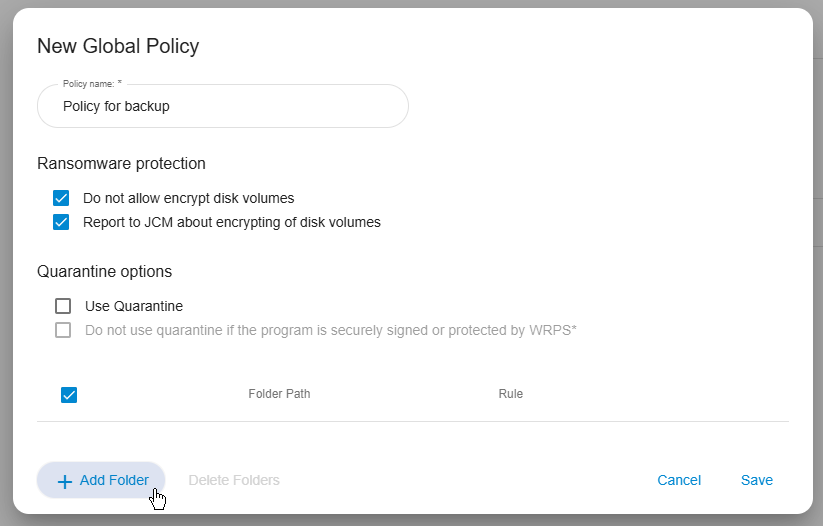
In this example, backups are saved to E:\Backup. Add this path and save.
Step 2: Create Access Rule
- To make the copies immutable, you need to block access to the backup directory for any unauthorized application or user. In the policy, add a new rule.
- The backup application itself still needs access, or it won’t be able to create new backups or run restores. Set the rule to Selected users and Selected programs, then add your backup application. In this case, that’s JSrvMgr.exe.
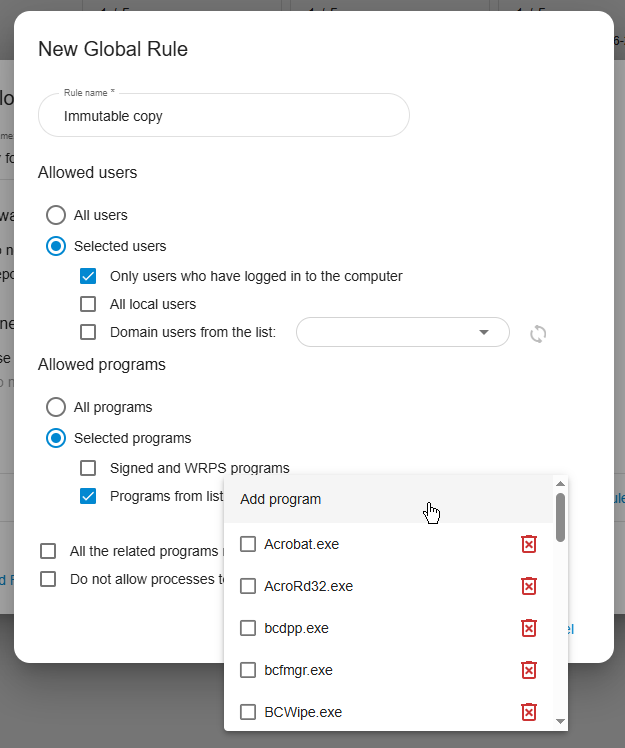
Step 3: Add Allowed Programs and Save
- Select explorer.exe so backup copies can still be managed through Windows Explorer. Save the rule.
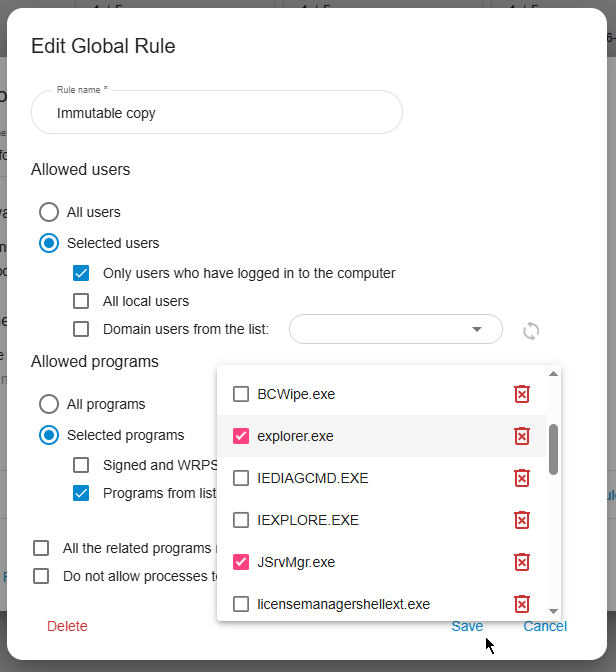
Step 4: Assign Rule to the Folder
- Back in the policy, assign your new rule to the backup folder and save the policy.
Step 5: Apply the Policy
- Go to Management → Choose a computer. Under the Data Shelter Policy card, disable Select group policy so you can assign a specific policy.
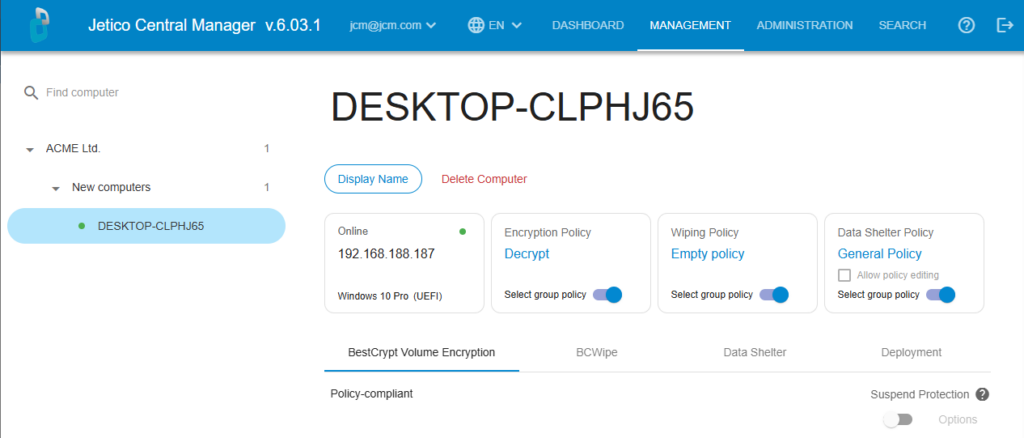
- Select “Policy for backup” and click Apply.
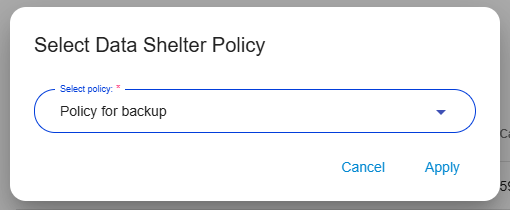
- The policy is now active. Any application or user not listed in the rule will be blocked from modifying the backup files.
Strengthen Your Backup Security
Now that you’ve made your backups immutable, you’ve taken a major step toward staying resilient against today’s ransomware and keeping your recovery data safe
Ready to add immutability to your setup with BestCrypt Data Shelter? Request a free trial or reach out to our Data Protection Specialists to learn more.
Frequently Asked Questions (FAQs)
An immutable backup is one that can’t be changed, deleted or tampered with once it’s created. This isn’t just a rule: it’s enforced by technical controls in your storage or backup software, so not even administrators can alter the backup until its set time is up.
No, you probably don’t have to start over. Most companies can keep their current backup system. With a tool like BestCrypt Data Shelter, you can add extra protection to your existing backup folders—making them immutable—without changing how you already work.
Not quite. ‘Read-only’ settings can sometimes be bypassed by admins or advanced malware. Immutability goes a step further and makes it technically impossible to change or delete your backups, even if someone gets access.
Yes! More and more regulations expect you to prove your data hasn’t been tampered with and that you can recover it if something goes wrong. Making backups immutable is a strong way to demonstrate that you’re protecting data from ransomware, accidents and insider threats.