

Updated: 13 Aug 2026
Originally Published: 24 Jun 2024
BCWipe Total WipeOut brings users the ability to erase hard drive data and follow NIST guidelines in a single click.
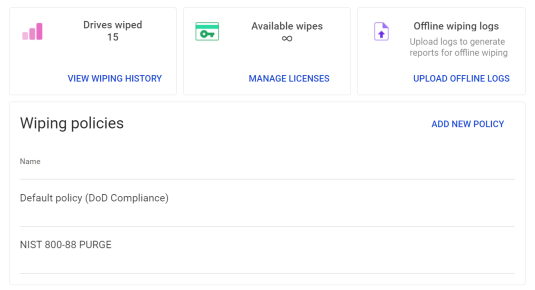
BCWipe Total WipeOut, Jetico’s solution to wipe entire hard drives, now addresses the practical needs of organizations dealing with NIST requirements by featuring a preconfigured wiping policy that meets the NIST 800-88 Guidelines for Media Sanitization.
How the NIST 800-88 PURGE Policy Works in BCWipe Total WipeOut
To ensure adherence to the NIST 800-88 Guidelines for Media Sanitization, users simply need to select the ‘NIST 800-88 PURGE’ wiping policy when setting up the bootable media.
The wiping policy includes:
- Implementation of hardware-level erasure techniques, such as NVMe User Data Erase.
- A verification step to provide confirmation of successful data erasure.
- A notification system that informs if the wiping process results in a Clear or Purge level of sanitization.
Want to learn more about following NIST requirements in just a few clicks?
Consult our Data Protection Specialist.
Key Benefits of Single-Click NIST-Compliant Wiping
- Gain Peace of Mind
Fully meet NIST guidelines when wiping hard drives - Save Time
Follow the NIST guidelines in a single click, allowing you to dedicate resources to more critical tasks - Streamline Auditing
Obtain tamper-proof wiping reports with ease for auditing purposes
Read the full announcement about our single-click NIST-compliant wiping solution or book a free demo now.
About BCWipe Total WipeOut
For over 20 years, BCWipe Total WipeOut has been trusted by the world’s top security organizations to erase the contents of traditional Hard Disk Drives (HDD), Solid-State Drives (SSD) and Solid-State Hybrid Drives (SSHD). Since 2016, Jetico’s data wiping solution has been certified by ADISA.
Find out more about BCWipe Total WipeOut and see how it can benefit your organization, or contact our data specialist for further inquiries or to request a free demo.

Frequently Asked Questions (FAQs)
NIST SP 800-88 defines approved methods for securely sanitizing storage media so data can’t be recovered. These methods include Clear, Purge and Destroy, depending on the sensitivity of the data and the type of device. Following NIST SP 800-88 is widely required for regulatory compliance, internal security policies and external audits.
Organizations can meet NIST requirements by using a preconfigured wiping policy that already aligns with NIST SP 800-88. This approach applies the correct erasure method and verification steps automatically, removing the need for manual configuration. It helps ensure consistency across devices and reduces the risk of human error during sanitization.
NIST SP 800-88 applies to a wide range of storage media, including HDDs, SSDs and NVMe drives. For modern storage, compliant wiping may involve hardware-level commands such as block erase or NVMe User Data Erase where supported. Verification confirms whether the result meets Clear or Purge requirements.
Verification confirms that the sanitization process was successful and that no recoverable data remains. It also provides documented evidence needed for audits, compliance reviews and internal reporting. Without verification, organizations can’t reliably prove that wiping was completed correctly.
Manual setup increases the risk of selecting the wrong method or skipping verification steps. These mistakes can result in failed audits or incomplete sanitization. Preconfigured policies reduce this risk by enforcing correct procedures automatically.