

Updated: 14 Aug 2026
Originally Published: 31 Jul 2023
Guarding against Data Breaches:
Understanding the States & Vulnerabilities of Your Data
What are the different states of data? In today’s digital world, where data is constantly accessed, shared and stored, understanding the states in which data exists is crucial for effective data management and security.
In this blog, we will discuss the 3 states of data and provide recommendations on the best ways to safeguard your valuable information.

What Are the Different States of Data?
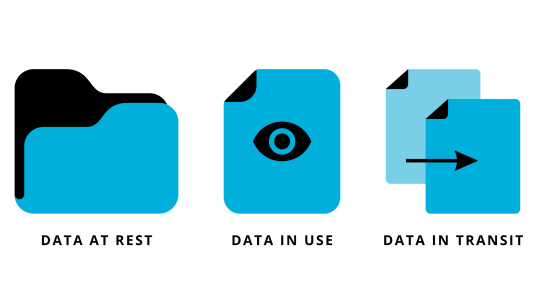
Data exists in 3 distinct states: Data at rest, data in use and data in transit. By recognizing the unique characteristics and vulnerabilities of each state, you can implement appropriate measures to protect your data. Let’s explore the states in detail.
Data at Rest
Definition
Data at rest refers to data that is stored or archived in physical or electronic storage devices. Examples include files on hard drives, backups or data stored in the cloud. This data is not actively accessed or processed.

Vulnerabilities
One common vulnerability occurs when devices containing unencrypted data are lost or stolen. Additionally, storing data in the cloud or on shared workstations without proper protection increases the risk of unauthorized access.
Best Practices for Data Protection
To effectively protect data at rest:
- Encrypt all drives and store selected files and folders in encrypted containers to prevent unauthorized access to data
- Use access controls and authentication mechanisms to restrict unauthorized access
- Store backups in secure locations to prevent data loss
Data in Use
Definition
Data in use refers to data that is actively being accessed or manipulated by users or applications. It includes data loaded into computer memory and data that’s viewed on screens. Examples include documents being edited or information displayed on web applications.

Vulnerabilities
Whether it’s automated processes handling data or an employee viewing or modifying information, this state of data poses inherent vulnerabilities. The primary concern arises from the fact that data in use is generally unencrypted and easily accessible. This means that during its active state, data is most vulnerable to breaches and unauthorized access.
Best Practices for Data Protection
So how can we protect data in use?
- Utilize robust user authentication measures to control access
- Implement protection techniques to protect sensitive data during processing
- Regularly monitor and audit data access to identify potential security breaches
Data in Transit
Definition
Data in transit refers to data that is in motion between different locations or networks. It occurs when data is transmitted across networks like the Internet or local area networks. Examples include data sent via email or transferred between servers.
Vulnerabilities
As this type of data travels across the internet and company networks, it inherently becomes more vulnerable than data at rest. During transit, there are increased risks of exposure to third parties that may compromise sensitive information sent via email or stored on cloud-based platforms like Dropbox.
Best Practices for Data Protection
To protect data in transit:
- Use secure communication protocols like HTTPS or VPNs to encrypt data during transmission
- Implement email encryption to protect sensitive information in transit
- Consider using secure file transfer methods to maintain data confidentiality
The Importance of Data Security in Each State
Data security is paramount in all states to prevent unauthorized access, loss or alteration of sensitive information. By implementing robust security measures for data at rest, in use and in transit, organizations can mitigate the risks associated with data breaches and maintain data integrity. Check out our Guide to Enterprise Data Protection for more information about implementing security policies and solutions.
Encryption for Data at Rest, in Use & in Transit by Jetico
If you’re still looking for encryption software, BestCrypt by Jetico offers a variety of features to secure data.
For data at rest, BestCrypt Volume Encryption delivers encryption for entire hard drives. This ensures that even if fixed or removable devices are lost or stolen, your data remains inaccessible to third parties.
When it comes to protecting individual files and folders, BestCrypt Container Encryption is the perfect solution. It creates encrypted containers where you can securely store as many files and folders as needed. This not only provides excellent protection for data at rest but can also be used to protect data in transit when working with cloud storage and encrypting email attachments.
For data in use, BestCrypt Data Shelter enables you to create protection policies for selected folders. This prevents unwanted processes from accessing your active data.
By utilizing our comprehensive suite of solutions, you can effectively protect your data in all 3 states: at rest, in transit, and in use. Contact our Data Protection Specialist to learn more or request a free trial.
Frequently Asked Questions (FAQs)
Each state comes with different risks and attack surfaces. Data at rest is vulnerable to device theft or unauthorized access, data in use is exposed while actively processed in memory and data in transit can be intercepted during transmission. Understanding these differences helps organizations apply the right protections to each stage.
Encryption is the core safeguard for stored information. Full disk encryption protects entire drives if a device is lost or stolen, while container encryption secures selected files with more flexibility. Strong access controls and secure backup practices add further protection.
Because data in use is temporarily unencrypted, controlling access is essential. Monitoring running processes, limiting which applications can open sensitive files and auditing user activity all help prevent unauthorized access. Tools such as BestCrypt Data Shelter can enforce these protections automatically.
Data in transit should always be encrypted to prevent interception. Secure protocols such as HTTPS, TLS, VPNs and encrypted email preserve confidentiality during transmission. For file sharing, organizations should rely on protected transfer methods instead of unencrypted channels.
BestCrypt Volume Encryption protects data at rest by encrypting entire drives. BestCrypt Container Encryption secures individual files and can also be used when sending or syncing data, helping protect information in transit. For data in use, BestCrypt Data Shelter applies protection rules to active folders and blocks unauthorized processes. Used together, these tools support a comprehensive, state-aware security strategy.