

Updated: 14 Aug 2026
Originally Published: 30 Aug 2022
Stay Ahead of the Latest Crypto Malware Attacks with BestCrypt Data Shelter
2021 was a breakout year for ransomware. According to last year’s Verizon Data Breach Investigations Report, ransomware doubled in frequency in 2021 and now appears in 10% of all data breaches. Unfortunately, this ransomware trend is continuing in 2022.
Two recent types of ransomware that emerged from May to July 2022 have been named ‘Lilith‘ and ‘0mega‘. Both operations have attacked numerous organizations worldwide, and in some cases the perpetrators have demanded millions of dollars in ransoms.

How Do the Attacks Work?
Lilith and 0mega are both examples of a new generation of malware called crypto malware. This is a type of ransomware that encrypts all the files on a victim’s system and then holds that data for ransom. Lilith and 0mega both come from the same strain of crypto malware, so the way they operate are similar. Here’s a brief outline of how they work:
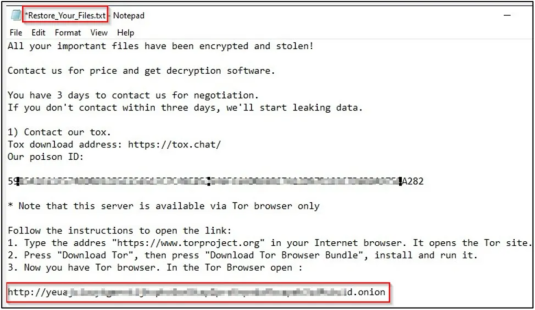
Firstly, the crypto malware penetrates a victim’s system and scans their files in search of the most valuable file extensions, such as .docx, .pdf and .xlsx. Then the malware will encrypt as many of those files as possible, leaving them unreadable and inaccessible. Finally, a ransom note will be left that instructs the targeted organization or individual to pay a large sum of money in order to regain access to their files.
How to Protect Yourself from Lilith and 0mega
Since crypto malware is essentially a type of malware, you should employ many of the same types of protection that are commonly used to safeguard you from malicious software. These include ad-blockers, anti-crypto mining extensions and trusted anti-virus solutions. You should also ensure that your operating system, applications and anti-virus signatures are regularly updated.
Use BestCrypt Data Shelter to Deny Crypto Malware Entry to Your System
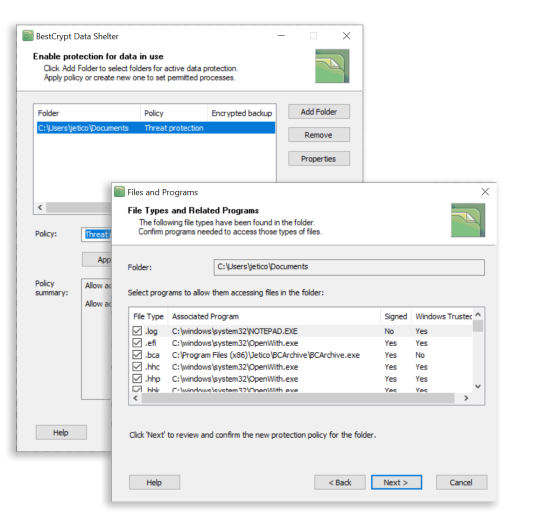
BestCrypt Data Shelter is a free tool that allows users to protect their data in use. The software works by safeguarding selected files and folders through the creation of protection policies.
When it comes to protecting your system from crypto malware attacks like Lilith and 0mega, BestCrypt Data Shelter acts as a firewall for your valuable data. By selecting which processes are permitted to access selected files and folders, the software will automatically deny access to everything else. This means that Lilith, 0mega and other types of crypto malware won’t have a chance to encrypt your data in the first place. Watch our simple 3-step video to enable BestCrypt Data Shelter and start protecting your data in use.
BestCrypt Data Shelter can further protect your system with smart analysis, which allows the software to detect when malicious processes are acting on behalf of trusted ones. This feature means that even the most sophisticated types of malware that may attempt to hijack your trusted applications can be stopped.
A final feature of the software keeps a close eye on anomalous disk activity. If BestCrypt Data Shelter detects extensive reads/writes, which are typically a sign of data being encrypted, the software can identify the process that’s causing the suspicious activity and terminate it.
Overall, BestCrypt Data Shelter helps to safeguard your data from crypto malware attacks and various other types of virtual threats. To learn more, here’s some extra information on the tool’s capabilities.
Start protecting your sensitive data by downloading the free tool.
Beyond Ransomware: Protect Yourself from AI-Powered Threats
Defending your files against ransomware like Lilith and 0mega is a critical step, but ransomware is just one part of the growing threat landscape. As AI is increasingly used to create more convincing phishing emails and personalized scam tactics, it’s more important than ever to broaden your protection. Learn how to stay ahead of these evolving risks with our guide onhow to protect yourself from AI scams. The article features 10 free and paid tools to help you strengthen your defenses.
Frequently Asked Questions (FAQs)
Crypto malware encrypts files on a victim’s system and demands payment for decryption. Unlike basic ransomware that only locks the screen or blocks access, crypto malware silently targets specific file types such as .docx, .pdf, and .xlsx. Because it acts quickly and quietly, early detection and data-in-use protection are especially important.
These malware families usually enter through phishing emails, malicious downloads, unpatched software, or compromised credentials. After gaining access, they scan for valuable files and encrypt them before displaying a ransom note. Keeping software updated and limiting unnecessary access rights reduces exposure.
BestCrypt Data Shelter lets you define which processes can access specific files or folders. Any unauthorized process, including ransomware, is blocked from reading or encrypting those files. The tool also monitors for suspicious behavior such as unusual disk activity and can automatically terminate malicious processes.
Some advanced threats try to hijack legitimate processes to avoid detection. BestCrypt Data Shelter includes analysis features designed to detect when a malicious process is acting through a trusted one, helping stop sophisticated attacks before encryption begins.
Data Shelter offers strong protection for data in use, but it should be part of a layered security approach. Pairing it with updated antivirus tools, safe browsing practices, regular patching, and additional safeguards significantly reduces risk. For full lifecycle protection, organizations can combine Data Shelter with encryption tools such as BestCrypt and secure wiping solutions such as BCWipe.