

Updated: 14 Aug 2026
Originally Published: 20 Apr 2021
Do you know how to permanently delete browsing history from your hard drive? Using an internet browser to clear your history is not the answer, as this method is ineffective from a security standpoint. If you want to ensure that your internet activities remain private, you must start getting rid of your browsing data for good.
This guide will first explain why clearing your internet history is not a secure solution, and then describe 3 key benefits of permanently deleting your browsing history instead. Finally, we will tell you step-by-step how to use data wiping software to completely remove your browsing data.

Why Clearing Your History Isn’t Enough
Your browsing history is more than just a record of all the websites you’ve ever visited. This history also includes cache files, cookies, search history, autofill data, and more. All in all, your browsing history adds up to a complete and personal footprint of your internet activities, so it’s only natural that you should clear it from time to time.
However, clearing your online history with your web browser or operating system doesn’t make the data disappear for good. In fact, these methods only delete the references of your files and leave behind the real data on your system as free space. While free space may eventually be overwritten by new files, in the meantime your data can easily be accessed by third parties with the use of free recovery software.
Benefits of Permanently Deleting Your Browsing History
Since you understand why clearing your browsing history is not a secure solution, let’s now take a look at 3 main benefits of permanently deleting your online data.
Benefit #1: Keep Your Data Away from Hackers
An unfortunate truth is that your browsing history can potentially end up in the hands of hackers. As mentioned above, attackers have the ability to restore your browsing information with file recovery software if the data hasn’t been permanently deleted. Loads of sensitive information is tied to our online activities so we must take precautions to avoid potential leaks.
Recovering files, however, isn’t the only threat posed to your online data by third parties. Hackers can also steal cookies to view your personal information. As experienced with an incident involving Yahoo, a data breach can result in attackers being able to forge cookies for millions of users and ultimately gain access to their accounts. By permanently erasing your browsing history on a regular basis, you significantly reduce the chances of being a victim of this kind of attack.
Benefit #2: Practice Online Cyber Hygiene
Even though privacy regulations like GDPR help to protect our data, the reality is that our information is being tracked whenever we use the internet. Our browsers remember the websites we visit, the files we download and sometimes even the passwords we use. Even if we browse in incognito mode, our activity is still monitored by websites in order to provide us with personalized advertisements.
While this tracking of our online activities cannot be avoided, we can still minimize our virtual footprint and reduce security risks by regularly deleting our browsing history. We can then enjoy greater privacy and limit the amount of personal information that exists about us at any one time.
Benefit #3: Privacy for Computer Sharers
Companies and organizations with a shared workstation policy, such as call centers, will generally have multiple employees using a single computer. The downside of this practice is that a lot of personal information will accumulate on each PC, including the browsing history of every user. In the interests of privacy and safety, it would be sensible for these kinds of organizations to permanently delete the browsing history from their computers on a regular basis.
On the other hand, if you’re just sharing a computer with a partner or family member, that doesn’t necessarily mean you have to share your browsing data with them too. Of course, it’s always possible to clear your internet history with your web browser, but if you really want to keep your online data private then you should permanently delete it from your hard drive.
How to Permanently Delete Browsing History with BCWipe
Now you know about the advantages of permanently deleting browsing history from your hard drive. Let’s see how to actually do it. The best way of removing all the information about your internet history, including free space and data remanence, is to use data wiping software. While you are surely free to choose your own tool, our step-by-step instructions will show you how to use Jetico’s BCWipe.
Step 1: Install & Open BCWipe Task Manager
If you haven’t already done so, you can begin by installing BCWipe. For help with installing the software, please watch this how-to video.
Not quite ready to purchase the software yet? No problem — get started with your free trial today.
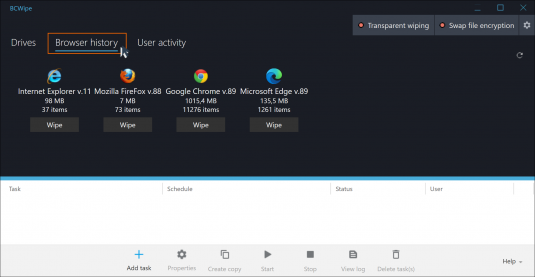
- Launch ‘BCWipe Task Manager’ from ‘Start’ –> ‘BCWipe’
- Switch to the ‘Browser history‘ tab
Step 2: Select Browsing Data to Remove
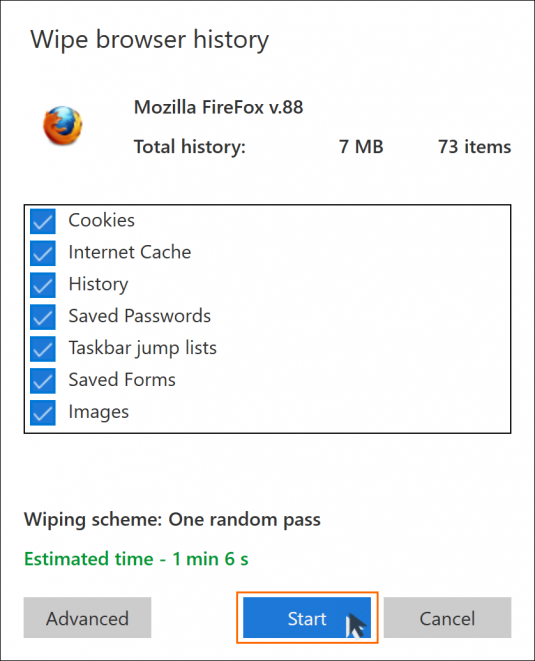
Choose the browser and the type of data that you wish to wipe.
- In the ‘Browser history‘ tab, click the ‘Wipe’ button under the browser from where you want to remove history
- Select one or more items that you would like to permanently remove, such as ‘Cookies’, ‘Internet Cache’, ‘History’ or ‘Saved Passwords’
- Click ‘Start’
Optional Step: Wipe Free Space for SSD Users
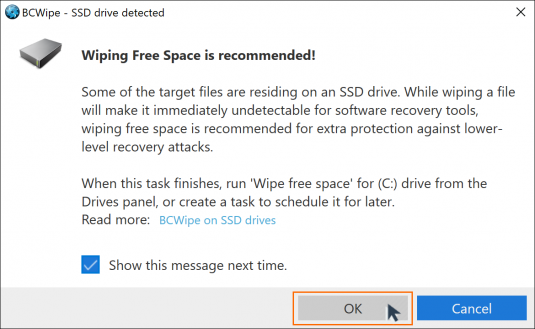
This is an optional step that only applies to users wiping data from solid-state drives (SSD).
- If files are stored on an SSD drive, you will see a message to run the ‘Wipe free space‘ task to prevent data recovery
- Click ‘OK’ to dismiss the message
Step 4: Run Wiping Process
Now you can sit back and wait for your browsing history to be wiped.
- The wiping process will now begin with the default settings applied

- You will receive a notification once the task has finished. Click ‘OK’ to dismiss the message

To keep your online activities private, permanently deleting browsing history from your hard drive is clearly the way to go. When you use data wiping software to erase your browsing data on a regular basis, you will minimize the chances of third parties accessing your data and reduce the size of your online footprint.
To find out more about data wiping, check out our ultimate guide to securely wiping computer hard drives clean.
Frequently Asked Questions (FAQs)
Clearing history removes only visible references, not the underlying data stored on your drive. That leftover information, known as data remanence, stays in free space and can be recovered with forensic tools. Permanent wiping is needed to remove it fully.
Your browsing footprint includes more than visited URLs. Cookies, cached pages, downloads, autofill entries, saved passwords and session data can reveal sensitive details. Permanently deleting them reduces the risk of tracking or unauthorized access.
Use data wiping software to overwrite browser traces and any residual remnants. BCWipe lets you select specific browsers and data types, then securely erase them beyond recovery.
Yes. SSDs use wear-leveling, which can leave data in unexpected locations. After wiping selected items, run a wipe free space task to overwrite leftover data across the SSD.
Wiping browsing data removes only the items you choose, such as cookies or cache. BCWipe lets you keep saved logins or bookmarks while removing sensitive traces. Always check your selection before running a wipe.