

Updated: 13 Aug 2026
Originally Published: 11 Dec 2024
A data spill is a security violation that goes far beyond an IT hiccup – it can put sensitive information at serious risk. While data spills differ from data breaches due to being accidental in nature and not carried out with ill intent, they can still jeopardize security, violate compliance regulations and harm an organization’s reputation if not addressed quickly and effectively.

In this blog, you’ll learn:
- What data spills are
- How they occur
- 5 steps to respond to data spills effectively
- Common challenges
- How to use BCWipe to help manage data spills
Let’s get started and find out how you can turn a difficult situation into a manageable one with the right tools and approach.
What Is a Data Spill?
Data has an inconvenient habit of residing somewhere it shouldn’t. But when classified information ends up on an unauthorized system as a result of human error, the result is something more than mere inconvenience. A data spill is a security violation, also known as a negligent discharge of classified information (NDCI), that can compromise both security and compliance.
Whether it’s classified data on unapproved systems or proprietary information in public spaces, data spills pose serious risks. Recognizing and addressing them quickly is an essential component of keeping your sensitive information protected.
How Can Data Spills Occur?
Data spills can happen in various ways, but they are normally caused by human error or system vulnerabilities. Here are 5 common scenarios that lead to data spillages:
- Transfer to Unauthorized Systems
Sensitive data can be accidentally sent to systems that are not allowed to handle it. This can happen through email attachments, file transfers, or unsecured digital media. - Public Exposure
Misconfigured cloud storage, social media posts or uploads to public forums can unintentionally expose confidential data to unapproved users or the public. - Weak Access Controls
Unclear user permissions can let unauthorized employees access sensitive data. This increases the risk of exposure. - Errors During Data Migration
Having improper security measures in place during data migration processes can lead to sensitive information unintentionally leaking to unsecured locations. - Misclassification
Incorrect labeling of files or changes in data classification, i.e. from classified to unclassified, can cause data to end up on unauthorized systems.
How to Manage a Data Spill: A 5-Step Response Framework
Even with strong policies and user education in place, it’s still possible for data spills to occur.
NIST SP 800-61 outlines best practices for incident handling, including containment, eradication, and recovery steps applicable to data spill scenarios.
NIST SP 800-61 Rev. 2 – Computer Security Incident Handling Guide
Responding quickly and effectively is critical to minimize risks and prevent further exposure. Here, you can read about 5 steps that can be followed to manage a data spill:
Step 1: Identification & Discovery
The first step in managing a data spill is to pinpoint where the spilled data resides and how far it has spread.
Data spills are often reported by users who are able to recognize and report potential spills to designated security contacts. Beyond user reports, proactive measures like monitoring, auditing and logging can also identify data spills.
Once data spills are identified, an immediate assessment should be carried out to track the movement, storage and access points of the spilled data, as well as affected users.
Step 2: Containment & Isolation
Once a data spill is identified, the next step is to contain it to prevent further exposure. Containment involves isolating affected systems or users and taking immediate actions to stop the spread of sensitive information.
In order to contain the data spill, you may have to physically isolate or logically separate compromised devices or systems from the network. Logical separation is achievable by temporarily disabling software functionality or applying stricter access controls.
Step 3: Impact Assessment
With the spill contained, the next step is to assess the extent of the incident and its potential impact. A thorough evaluation helps organizations determine the necessary cleanup actions and mitigate the risks associated with the spill. Assessments can include:
- Reviewing affected systems and users.
- Notifying data owners and understanding the sensitivity of compromised data.
- Conducting a damage assessment to evaluate potential harm.
Step 4: Remediation & Sanitization
Once the assessment is complete, the focus shifts to remediation—securely addressing exposed data and restoring affected systems.
Key considerations for remediation include:
- Access Controls
Restrict unauthorized access to exposed data and systems. - System Priority
Focus on critical systems and data with prolonged exposure first. - Sanitization
Use trusted data wiping software to securely eliminate sensitive data. - Future Disposal
Plan for secure asset handling at the end of a device’s lifecycle.
Step 5: Prevention & Policy Improvement
The final step in managing a data spill is prevention. Analyzing the root cause to understand how the spill occurred and implementing measures to avoid future mishaps, such as creating an incident response plan.
Start by reviewing the incident to identify key factors, such as policy non-compliance, procedural gaps or missing technical controls. Based on this analysis, take steps to strengthen your organization’s defenses. This may include employee training and awareness, improved technical controls, or updates to policies.
By learning from each incident and proactively reinforcing policies and systems, organizations can significantly improve their chances of preventing data spillages in future.
Challenges of Handling Data Spills
Managing data spills is a complex process, but 3 key challenges stand out:
1. Time Sensitivity
The longer a data spill goes unresolved, the greater the risk of exposure, dissemination and damage. Containing and remediating a spill requires immediate action, but quickly identifying all affected systems, users and data can be a difficult task without the proper tools in place.
2. Tracking Data’s Path
Understanding where spilled data has moved is essential to containment and remediation. But sensitive data might be copied, forwarded or stored in multiple locations—emails, backups, shared drives or external platforms—making it challenging to trace its full journey.
3. Ensuring Sanitization
Even after data has been identified and contained, verifying that it has been permanently removed is vital. You want to ensure that no overlooked files, backups or cached data re-emerge later, potentially reigniting the incident. Confidence in complete eradication requires precise tools and robust processes.
ENISA guidance highlights accidental data exposure as a recurring organizational risk and stresses rapid response and secure data removal.
ENISA – Data Protection and Accidental Data Exposure
Best Practices for Cleaning Up a Data Spill with BCWipe
Search is a new feature for BCWipe, Jetico’s long-trusted data wiping software. Designed to help administrators efficiently locate sensitive data across endpoint devices, Search can help organizations manage data spills and mitigate the 3 challenges listed above.
Identify Data Spills Quickly & Track Data’s Path with Search
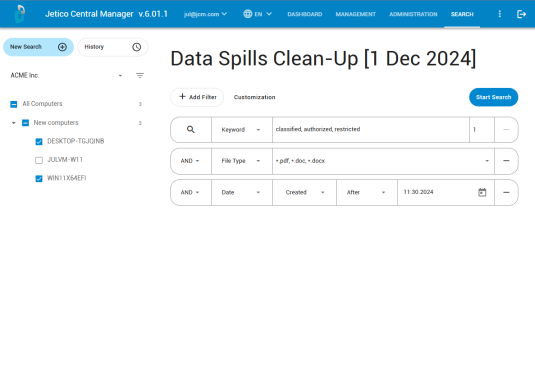
BCWipe’s Search tool allows organizations to efficiently locate and assess spilled data with precision. By using Search’s advanced filters, you can narrow search results by parameters such as file size, type or creation date. So, if the data spill happened recently, you can focus your search on the relevant timeframe.
You can also use Search to upload a file’s hash —a unique digital signature— to locate exact matches across devices, eliminating the need for manual searching. In addition to using Search to find identical files, the feature can also rate the similarity or proximity of other files to the original. This can help to discover files that may have been tampered with or changed to some extent, with users then able to decide if they want these similar files to be wiped as well.
Sanitize Files Immediately with BCWipe
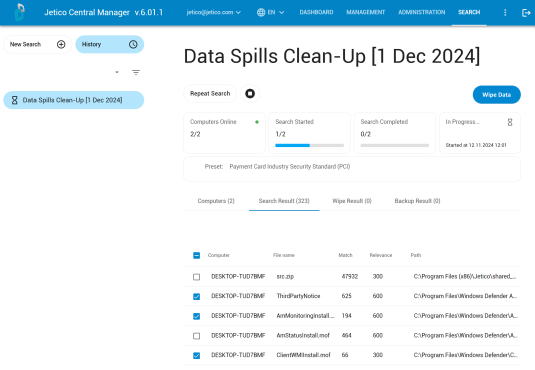
After identifying files with Search, you would normally move to the Contain step that is explained above. However, because BCWipe’s remote management allows you to react so fast, you won’t need to isolate the affected endpoints or disconnect them from the network. Instead, once you have used Search to pinpoint where spilled data resides and track the information’s full path across your systems, you can immediately sanitize the data from multiple endpoints by clicking a single button.
Verify Wiping Results
After wiping is complete, you will receive confirmation of sanitization, log files and a certificate of destruction that may be required for compliance or auditing purposes. You can now choose to run a sector-level verification with BCWipe, which will eliminate the possibility of error by checking every sector to make sure data has been overwritten for good. If you’re still looking for additional reassurance, feel free to run Search again to make sure the data is no longer there.
Respond to Data Spills with BCWipe
Trusted by the U.S. Department of Defense for over 20 years, BCWipe is Jetico’s software for wiping files and data remanence beyond forensic recovery, such as in response to classified data spills. In addition to handling classified spill incidents, BCWipe is also relied upon for the secure destruction of Controlled Unclassified Information (CUI), making it a versatile solution for a range of federal data protection needs.
BCWipe supports the U.S. DoD 5220.22-M wiping schemes, as well as the IEEE 2883-2022 and NIST 800-88 standards. BCWipe – Enterprise includes the Search feature and central management for remote wiping and client software control.
To get started with BCWipe and the new Search feature, you can contact our Data Protection Specialist and request a free trial or demo.
Frequently Asked Questions (FAQs)
A data spill occurs when sensitive or classified information is unintentionally exposed to an unauthorized system, user, or location. Unlike a data breach, which involves malicious intent, a data spill is typically caused by human error or process failures. Even though it is accidental, a data spill is still considered a security violation and may trigger regulatory or internal reporting requirements.
The first step is to identify where the exposed data resides and contain the spill to prevent further access or distribution. Next, the organization should assess the scope and sensitivity of the data involved, securely remediate all affected locations, and document the incident. Acting quickly is essential, as delays increase the risk of duplication, backups, or wider exposure.
Standard file deletion only removes references to the data and does not erase the underlying information. Residual data can remain in free space, temporary files, caches, backups, or system logs. In spill scenarios, this leftover data can continue to pose a risk even after files appear to be removed. Secure data wiping is required to ensure the information is permanently eliminated.
Effective spill response requires the ability to discover where sensitive data exists and verify that it has been securely removed. Organizations typically use data discovery tools to locate exposed files across endpoints, followed by secure wiping to eliminate all recoverable traces. Verification and reporting capabilities are also important to demonstrate that remediation was completed correctly during audits or investigations.
Without verification, organizations cannot be certain that all exposed data has been removed. Verification confirms that wiping was successful and provides evidence for audits, regulators, or internal investigations.