

Updated: 17 Aug 2026
Originally Published: 31 Jan 2017
If you’ve ever touched a computer, chances are that by now, you’ve used the cloud for storing files. It’s not just IT pros like me that are relying on the cloud — kids and grandmas alike know all about it. Sadly, this awareness also includes data breaches and millions of your passwords and files being opened to the public.
The bottom line? Whether you’re an IT professional, the owner of a coffee shop or a grandma, secure encrypted cloud storage is of paramount importance if you plan to share sensitive files.

Why Is the Cloud Vulnerable?
Most cloud storage providers use some kind of encryption. You can check their Terms of Service to learn more.
Yet as it turned out with some popular tools — such as Dropbox and iCloud — despite their encryption, hackers still found ways to get access to your files with your online password. The best way to protect against this kind of theft is to have your own ‘keys’ to your files and take back control of your privacy with file encryption software.
Online Passwords vs. Your Own ‘Keys’ — What’s the Difference?
Imagine you don’t own the keys to your house. Whenever you want to enter your house, you have to submit a request from whoever owns them. They don’t ever hand you the keys, but instead unlock the door for you and also lock it when you leave. Where do they keep your keys? What do they do with your keys while you’re away? How do they know it’s really you asking for the keys? What if the keys get stolen or made available to the public?
This idea is not so far-fetched. The landscape of cloud storage and online passwords looks just like this. Do you want secure your private files beyond online passwords? Take back your ‘keys’ and add file encryption software!
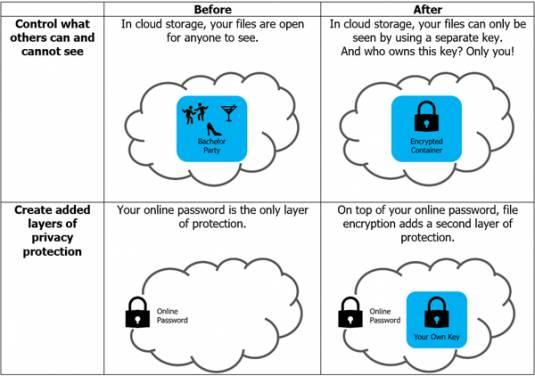
Cloud Storage Before & After File Encryption — How Does It Work?
First, why is all this encryption so important? Relying on file encryption software allows you to:
- Control what others can and cannot see
- Create added layers of privacy protection beyond vulnerable online passwords
3 Key Questions Before You Decide
There are many file encryption software options on the market. A quick search will prove it. But these abundant choices can lead to confusion… ‘Which tool should I select?’. Here are 3 easy questions to help you define your needs:
#1 How Many Encryption Passwords Do You Need to Remember?
When you are active online, there are 2 common methods for encrypting files — locking down each individual file one-by-one or storing many files in encrypted containers or folders. The first requires superhuman memory skills — a unique password for each of your files; the second is much easier on the brain, requiring just one password per container or folder.
#2 Who You Gonna Call?
“If there’s something weird
And it don’t look good
Who you gonna call?”
Whether you’re an IT admin, a lawyer or a home user, software comes with ‘ghoulish mysteries’. Contacting professional tech support is always a plus — from friendly advice when setting up your tool to professional support in case of ‘paranormal activity’.
#3 For Free, or Not for Free? That Is the Question
True, some encryption tools are available for free. Yet the cost is quite minimal for a reliable commercial solution including professional tech support — from 15 to 30 cents a day.
Take Back Your ‘Keys‘ & Your Privacy
I understand — encryption keys may raise concerns about trust. Even if secure encrypted cloud storage tools are designed to not store ‘keys’, they have the capability to build in a ‘backdoor’ — just what it sounds like, a way for unauthorized people to sneak in and access your files without your permission.
To ensure your encryption provider is not fooling you, one way is to inspect their source code. If you haven’t a clue about source codes, no worries… Look for an official statement from the company about backdoors, or simply contact them to learn more about their policy.
BestCrypt Container Encryption for Files & Folders by Jetico
Jetico provides pure and simple file encryption software for National Security, Compliance and Personal Privacy. To protect stored data, Jetico’s BestCrypt delivers an encryption solution with no backdoors (check the source code), that works seamlessly on encrypted files and folders. BestCrypt Container Encryption users can also rely on professional technical support.
For people accessing encrypted files on the go from different devices and operating systems, BestCrypt offers cross-platform capability on Windows, Mac, Linux and Android. This ability is extended by BestCrypt Traveller, which allows users to access their data even where BestCrypt Container Encryption is not installed.
Get started now with a free trial
Technical or commercial questions? Contact us
Looking for an alternative to Boxcryptor? Read 3 reasons why you should choose BestCrypt.
Frequently Asked Questions (FAQs)
Most providers encrypt files only after upload, meaning your data can still be accessed with your account password. Using client-side encryption ensures only you hold the encryption keys.
It offers no-backdoor encryption, verified source code transparency, and full control of your encryption keys — all while supporting Windows, Mac, Linux and Android.
File-level encryption locks individual files one by one, while container encryption secures entire folders with a single password, making management simpler and more secure.
Choose vendors that are transparent about their technology, such as Jetico, which allows inspection of its source code and clearly states its no-backdoor policy.
Yes. With BestCrypt Traveller, you can safely open encrypted containers even on computers where the full software isn’t installed.