

Updated: 13 Aug 2026
Originally Published: 26 May 2026
Can ransomware be stopped before it encrypts your files?
Most security tools are designed to detect ransomware after it starts running. However, this approach is not always successful, as by that point, the process may already have access to sensitive data, allowing encryption or modification to occur before any action is taken.
A different approach is to control which applications can access sensitive data in the first place, ensuring that unauthorized processes can’t encrypt or modify files, even if they manage to run.
BestCrypt Data Shelter is a policy-based data access control solution that decides which users, applications and processes can interact with protected files. By enforcing access control directly at the endpoint, only trusted activity reaches sensitive data.
To understand how effective this approach is in practice, we tested BestCrypt Data Shelter using KnowBe4 RanSim, a tool designed to simulate real ransomware behavior in a controlled environment.
Why Ransomware Depends on Access to Data
Ransomware does not need advanced capabilities to cause damage. In most cases, it only needs one thing: access to data.
Once ransomware gains that access:
- Files can be encrypted
- Data can be modified
- Operations can be disrupted
Many security solutions attempt to identify ransomware based on behavior or known patterns. This model can be effective, but it means protection depends on detecting the threat in time.
So, what happens if the process is not detected in time? If an application can’t access sensitive data, it can’t encrypt it. This is where controlling access comes into play.
What Is KnowBe4 RanSim & What Does It Simulate?
RanSim is a free tool by KnowBe4 that mimics common attack techniques without causing real damage. The application runs multiple scenarios, from file encryption to stealthy deletion.
This test makes it possible to evaluate how a system responds to ransomware-like behavior under realistic conditions.
How We Tested Data Protection with RanSim
To evaluate BestCrypt Data Shelter, we created a controlled test environment:
- Sensitive folders were protected using access control policies, allowing only trusted applications to access protected files
- Unauthorized processes were blocked by default
- RanSim was used to simulate 23 known ransomware attacks
The goal: see whether ransomware-like processes could access and modify protected data under real conditions.
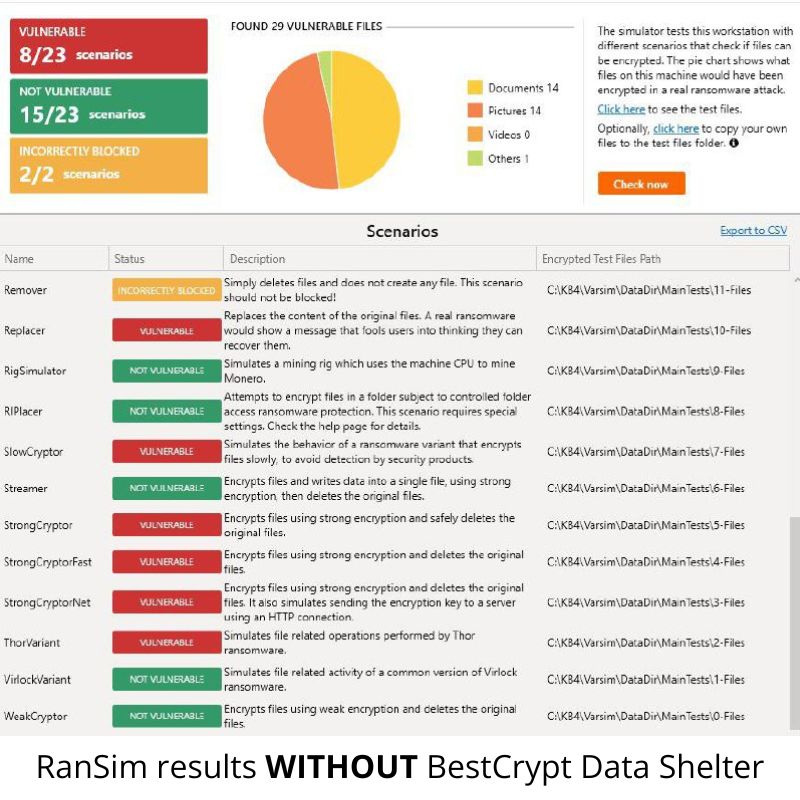
What Happens Without Data Access Control
Without any access control in place:
- ❌ 8 out of 23 simulations were successful
- Files were encrypted or modified in multiple scenarios
- Unauthorized processes were able to interact with sensitive data
This outcome reflects a common real-world scenario. Encryption protects data at rest, but the moment a file is opened, it becomes accessible to whatever process can reach it.
What Changes When Access Control Is Applied
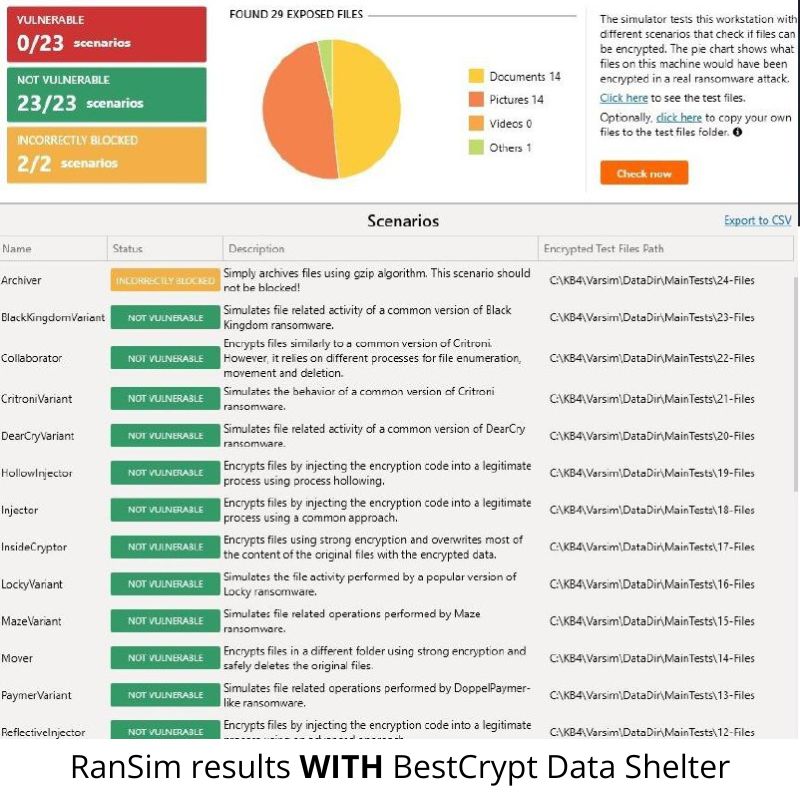
After enabling BestCrypt Data Shelter:
- ✅ 0 out of 23 simulations were successful
- No files were encrypted or modified
- Unauthorized processes were blocked from accessing protected folders
In practical terms, sensitive data remained intact throughout the test because ransomware-like behavior was stopped before it could act on the data.
Why Controlling Access Helps Prevent Ransomware
Ransomware depends on being able to interact with files. To encrypt or modify data, a process must first gain access to it. Without that access, the attack can’t proceed.
If access is denied:
- Encryption can’t start
- Modification can’t take place
- Attacks fail at their core step
This is why controlling access to data is critical for preventing ransomware.
With BestCrypt Data Shelter, users can define which applications are permitted to interact with sensitive files. Policies are applied directly at the endpoint, so only trusted users, applications and processes are allowed – everything else is blocked automatically.
Even if a malicious process manages to execute, it can’t access or alter protected data.
Detection vs. Access Control: 2 Different Security Models
| Detection-Based Model | Access Control Model |
|---|---|
| Identifies threats after execution | Helps prevent access before execution |
| Relies on known patterns or behavior | Relies on defined policies |
| Reactive approach – may respond after damage has already started | Proactive approach – helps stop the action before it begins |
Key Takeaway: Ransomware Can’t Encrypt What It Can’t Access
The RanSim test results highlight a simple but important point: with an access control model in place, ransomware can’t encrypt what it can’t access.
By controlling which applications and users can interact with sensitive data, BestCrypt Data Shelter helps prevent ransomware from executing its core function. Instead of relying only on detection, this approach focuses on stopping ransomware before it can act.
Access control is one layer of a stronger ransomware defense. It works well alongside immutable backups, which keep recovery copies safe even if an attack gets through. The same default-deny model also applies to shadow AI agents, another class of unauthorized process that access control stops before it reaches sensitive files.
For individuals, BestCrypt Data Shelter can be downloaded as a free security tool.
For organizations, BestCrypt Data Shelter is now available with centralized management. Administrators can create, distribute and enforce access control policies across endpoints from a single console. This new enterprise capability is currently available through the pilot program – apply for the pilot or contact our data protection specialists for a demo.
Test Disclaimer
Based on RanSim ransomware simulation testing under controlled conditions. Results may vary depending on system configuration and policy setup.
Frequently Asked Questions (FAQs)
Yes, in many cases. Ransomware needs access to a file before it can encrypt it. Policy-based data access control blocks untrusted processes from reaching sensitive data, so the attack fails before encryption starts. In a controlled KnowBe4 RanSim test, this approach stopped 23 of 23 ransomware simulation scenarios.
BestCrypt Data Shelter is a policy-based data access control tool that decides which applications can read or write protected files. Only trusted processes are allowed; everything else is blocked by default. Even if ransomware manages to run, it cannot reach the protected files. In Jetico’s RanSim test, BestCrypt Data Shelter blocked all 23 simulated ransomware attacks, compared with 8 successful attacks when no access control was applied.
KnowBe4 RanSim is a tool that simulates the behavior of real ransomware in a safe, controlled environment. It runs ransomware infection scenarios, including file encryption and stealthy modification, to test how an endpoint security setup responds, without causing real damage.
No. Data access control complements existing security tools rather than replacing them. Antivirus and EDR focus on detecting and responding to threats. Policy-based access control, such as BestCrypt Data Shelter, adds a separate layer that restricts which processes can reach sensitive data, protection that holds even when a threat goes undetected.
Yes. BestCrypt Data Shelter is available as a free security tool from Jetico for individual users. A centrally managed enterprise version, which lets administrators distribute access control policies across endpoints from a single console, is currently available through a pilot program.