

Updated: 14 Aug 2026
Originally Published: 26 Jan 2022
It’s no secret that attackers have unsuccessfully been trying to hack BestCrypt for years. This may not come as a surprise, as BestCrypt is known for not including any backdoors. But no matter how strong a software’s encryption might be, a system is only as strong as its weakest link. And the weak link is often the password.
But don’t worry, there are steps you can take to minimize the risk of your passwords being cracked. In this blog, we first offer tips on how to make your encryption software as secure as possible. Next, we provide you with a step-by-step guide on using key stretching to protect your data with BestCrypt Container Encryption.
Brute-Force Attacks
Attackers have a few techniques to choose from when attempting to steal your passwords. The most common are brute-force attacks, social engineering, and a specially designed password-intercepting malware known as keyloggers.
The simplest of these methods is the brute-force attack, which involves using automated tools to crack passwords by trying out all possible combinations of characters in a sequence. Brute-force attacks aren’t the quickest or most sophisticated way for hackers to crack passwords, but they can still be effective if users don’t take the right precautions.
Keep Your Encryption Strong
How would you best protect yourself from these kinds of attacks? Well, making your encryption software as secure as possible, of course! For BestCrypt users, here’s 3 security tips you can follow to do just that:
- Update your software
This may sound a little obvious, but it’s important that you always have the latest version of the software installed. Updates often include protection to the latest threats, so you should regularly check to see if your software is up to date.
- Update your encrypted containers
As well as the software itself, users of BestCrypt Container Encryption should also update their encrypted containers. To receive all the benefits that come with the latest version of the software, you should make sure every existing container is using the latest key generator. To do this, launch BestCrypt Control Panel and browse through the list of containers on your PC.
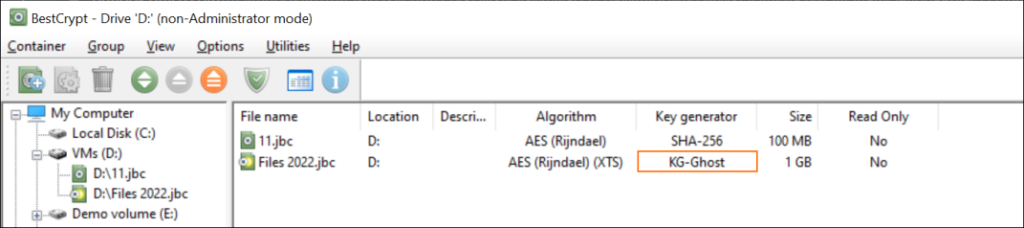
If you see something other than KG-Ghost in the key generator column, it’s time to migrate your data to a newer container. As a best practice, create new containers every 1-2 years to ensure your encrypted containers will hold up to the latest threats.
- Protect your passwords with key stretching
Finally, you can use key stretching techniques to gain advanced protection against brute-force attacks. Key stretching will effectively increase the time it takes for attackers to test each possible key. To find out how to use key stretching with BestCrypt Container Encryption, check our step-by-step guide below.
How to Use Key Stretching to Protect Your Passwords
Protection against brute-force attacks is applied by default when creating encrypted containers in BestCrypt Container Encryption. Using key stretching techniques, however, will add further protection for those who want to be extra secure.
Before we get into the steps, let’s have a quick word about creating secure passwords. A great password contains 12 symbols or more and includes upper- and lower-case letters, as well as numbers and special characters. Here’s some more tips on creating strong passwords.
Step 1: Getting Started
- Launch BestCrypt Container Encryption
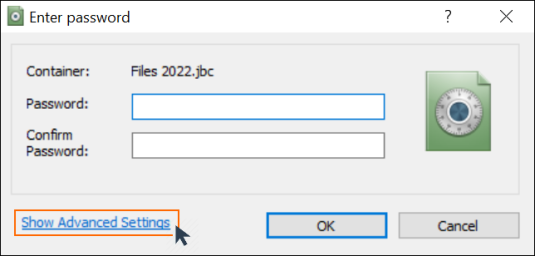
- When prompted to enter a password during container creation, click ‘Show Advanced Settings’
Step 2: Creating a Strong Password
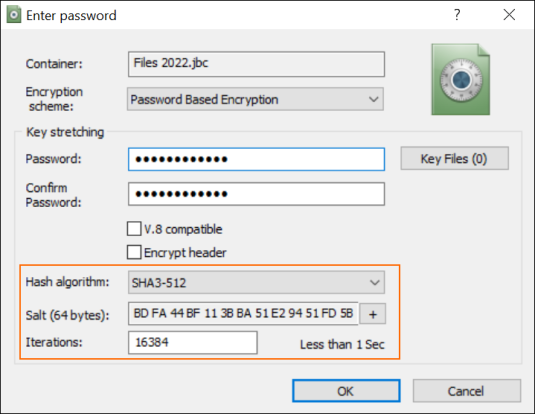
- Enter and confirm a strong password that is difficult to guess
Step 3: Key Stretching
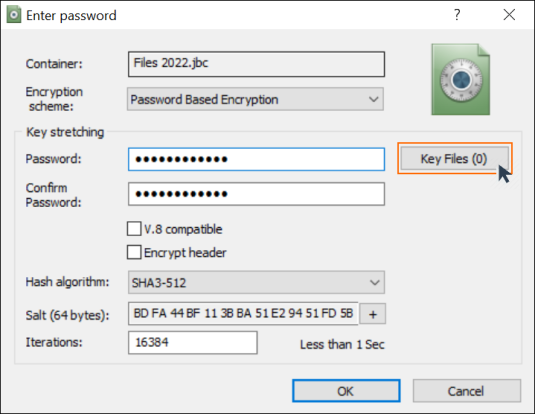
- Choose a strong ‘Hash algorithm‘ (we recommend SHA3-512)
- The ‘Salt‘ will be generated automatically and can be refreshed by clicking the ‘+’ icon
- In the ‘Iterations‘ box, you can define how many times the hash algorithm will be applied during the key derivation process. Assuming you entered a strong password, the default iteration value of 16384 will take longer than a lifetime to successfully brute force.
Note: The time indicator next to the ‘Iterations’ field shows how long it takes BestCrypt to check if the password is correct. This is the same amount of time you have to wait for your containers to open after entering the password, so don’t overdo it! We suggest you start by doubling the default value.
Step 4: Add Key Files
- Next to the key stretching password box, click ‘Key Files (0)’
Key files provide an extra layer of protection to your containers, meaning that entering the correct password isn’t enough to gain access. So even if your password is disclosed or stolen, attackers won’t be able to access your encrypted containers without the key files. This security measure provides additional protection against social engineering attacks and password-intercepting malware. See more information on using key files.
Bonus Step: Enable Anti-Keylogger
As a final touch for the security minded, you can also enable BestCrypt’s Anti-Keylogger.
When entering your encryption password, the Anti-Keylogger tool will safeguard it from being intercepted by password-targeting malware by masking the keystrokes you make with random ones.
- Open the BestCrypt Container Encryption Control Panel
- Under the menu bar, click ‘Options’
- See the tool in action for yourself by clicking on Anti-Keylogger settings
To Sum Up
Although no encryption software can guarantee absolute protection, you can still take significant steps to ensure your data and privacy are as secure as possible.
Don’t know where to start with BestCrypt Container Encryption? Check our ultimate guide to encryption and protection.
Frequently Asked Questions (FAQs)
Brute-force attacks try password combinations at high speed until one works. Even strong encryption can’t protect a container if the password is weak, reused or outdated. This is why password hygiene and proper key-derivation settings are essential for secure encryption.
Key stretching repeatedly applies a hashing algorithm to slow down each password guess. This dramatically increases the time and computing power required for a brute-force attack while keeping the login experience the same for legitimate users.
Recreating containers every 1–2 years is a good practice, especially after Jetico releases a new key generator. Updating ensures your data benefits from the latest cryptographic strength and protections against newer attack techniques.
Key stretching strengthens your password against brute-force attacks, while key files serve as a second authentication factor. Even if someone obtains your password, they won’t unlock the container without the matching key file.
BestCrypt’s Anti-Keylogger masks your real keystrokes with random input so keylogger malware can’t capture the actual password you type. This adds an effective defence against one of the most common techniques used to steal login credentials.